Showing posts with label Troubleshooting.. Show all posts

Sunday, February 17, 2013

Should you Beta?

I have really been going back and forth on the question of "should I allow beta tests on my machines?"  When I first set up machines specifically for boinc crunching, my initial thought was these I really wouldn't mind allowing Beta tests to run on them. Though the more I read beta test support forums there are quite a few things that give me pause.  So lets start with a Pro and Con list.

Pros:
  • Beta testers are an essential part of most if not all BOINC projects.
  • By allowing beta tests you allow quicker upgrades to projects and programs
  • I dare say you make yourself more valuable to the project ( though I do not really know of any major way projects show any sort of loyalty for this). 
Cons:
  • The projects want feedback from the Beta testers on how the projects ran, and dealt with their machines.
  • Beta tasks can cause quite a few issues, while I have not heard of any completely horrible CPU beta errors, with GPU tasks I have heard about Beta's messing up drivers, and causing completely lock ups and freezes of the machines.
  • You should have a decent ability to trouble shoot technological issues. At the very minimum you should know how to check a multitude of log files to pinpoint the output from the error to the log so you can give detailed feedback of exactly what the error was to the project.

The pros and cons are interesting, in the sense that to just about everyone the cons sound far worse than the pros, mainly due to the second bullet. The other two cons are of little consequence to me, I have no problem being in contact with the project through their project forums, or checking log files, and troubleshooting to some degree.

The real reason why I decided I am going to shy away from crunching beta tasks is the fact that I do not use my other machines on a regular basis for how they function usability wise while crunching. So I can't give feedback to the projects about how the Beta altered my computer more than it consistently errors out, or seemed to run fine.  While on my main machine, I get very scared every time something goes wrong on my main machine, even though I back up major files on a regular basis, I just hate going through the hassle of fine tuning my main use machine again to get it back to the condition I like it. 

Saturday, February 9, 2013

Ugh--- UBUNTU!!!

I jut came off of a very frustrating nearly 24 hours. As it turns out a software update buggered my Wireless drivers, as such caused some rather odd behavior in which it could find and locate networks, but not connect even with the proper credentials.

 But to be fair I slept and did other things through 16 hours of those 24 hours.  But in the trouble shooting those other 8 hours where split with 6 hours stumbling around in the dark, probably doing equally as much harm as good.  But if there is one thing I learned from this experience is:

When dealing with Ubuntu, the second you isolate your issue, do a detailed ubuntu help forums search.  I had long since narrowed it down to my wireless card, but the second I figured out the actual pci number on my wireless card I should have googled that instantly, as that is when the problems got resolved.

I say this because once I googled that little number, I found a plethora of threads ( all incredibly recently letting me know that I was not alone with this issue, and gave me hope that one of these actually has a proper worked out solution.  That it did.

I find it funny, almost ironic, that I had a botched upgrade from Ubuntu, less than a week after I defended Ubuntu even with their botched upgrades to someone from Highschool on Facebook.  Oh irony thou art a heartless bitch!

Sunday, January 20, 2013

Building a Computer Part 2: The Build!

I am not sure what to believe any more, the more you watch videos on building a computer the more and more the emphasize what goes wrong. ( New Egg has a nice 3 part series, part 2 features the actual building. ) These issues, seem like they can be so accidental, and not actually something you consciously do.  Static electricity being the biggest one.  Keeping this in mind probably pointed to my biggest issue in this build, sometimes force is necessary.

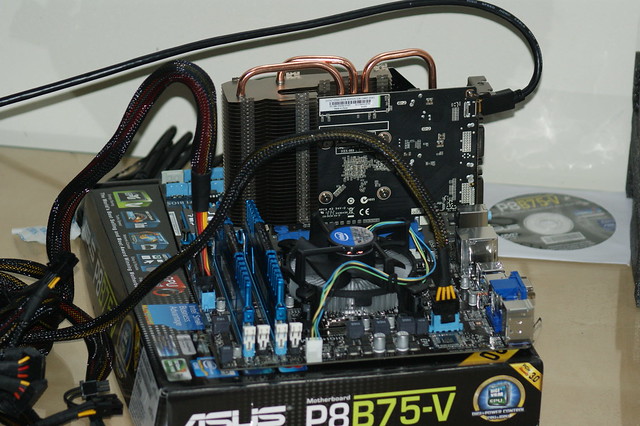
DSC02875

Part one was the test build before putting everything in the case.  the biggest thing to do in this portion is get the CPU into place.  The Intel i5 3350P uses a socket which they bill as "zero insertion force"  which let me just say can be quite misleading.   Let me just say while you just lightly drop/ place the CPU into the socket, of course being very careful to not touch the processor itself.  To close "cage/bracket" which locks the CPU into place it both sounds and feels like you are breaking something, as it honestly requires quite a bit of force.  Then it is simply putting on the heatsink/ fan, I decided to go with the stock fan included ( while I am a cruncher I am not into overclocking, so this should be sufficient).  Hook up the ram and the GPU, plug in the few required cords for the PSU, and do a test boot, hope you see the splash of the BIOS on the screen, and celebrate.

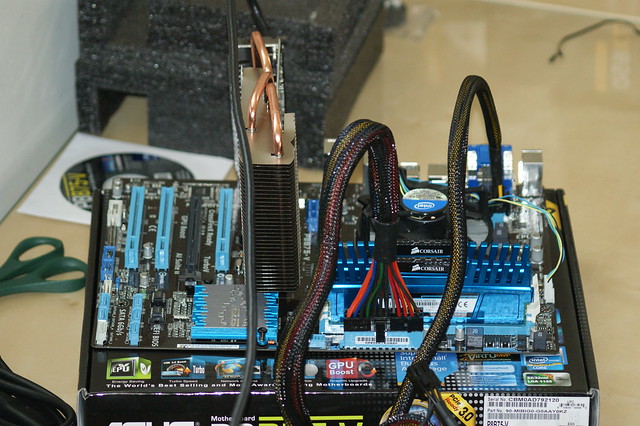
DSC02876


This is where the first issues of this build started to plague me,  I was not getting sustained power, so I was very scared something was shorting out the entire system.  Careful examination of the cords, caused me to realize the cord was not completely plugged into the PSU.  This was not the end of the issues, I was not getting anything on screen even though I did have sustained power this time.  Turns out more cords were not plugged in all the way, this time being the HDMI cord from the GPU to the screen.


Then comes the annoying part, putting everything into the case.  Let me just say your motherboard users guide is so important for knowing what cords go where.

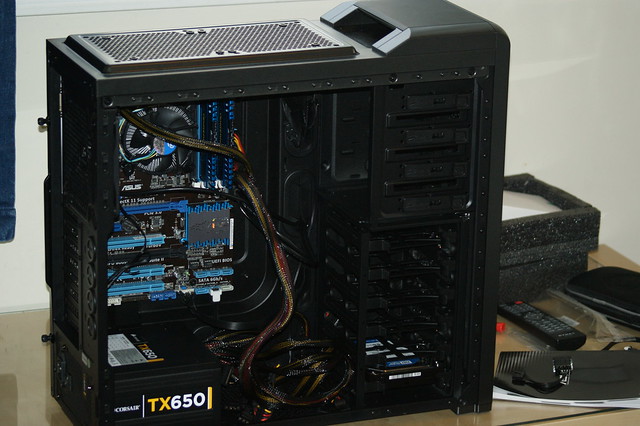
DSC02877

Everything is in except the GPU and the cords are not a complete mess.  Lets see it with the GPU in, a double form factor though passively cooled card Nvidia GT 640.

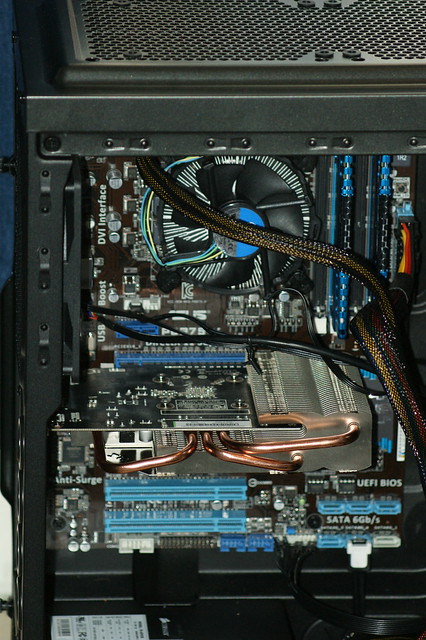
DSC02881

Alright lets boot up!  Uh Oh, nothing is showing up on screen.  The cord is completely plugged into the GPU, but the not enough force plagued me once more, turns out I did not completely seat the GPU, it needed that extra force, which I was scared to give because the MB bends slightly while inserting it.

Well now it is crunching away, though still in tweak mode.

Saturday, December 29, 2012

BOINC: CPU Time vs CPU Utilization

I mentioned I was going to run this experiment awhile back, and while I have been running it, I forgot exactly how my computer initially behaved, so switching a few settings back, I can now give a report on whether it is best to cut back on CPU Utilization or cut back on Percentage of CPU time BOINC uses.

Results:  I have found that in terms of both temperature control, and credits earned in a lengthy amount of time ( lets just say 1 month), that it is better to use all CPU's but throttle back the CPU time.

Hardware: This is on my Dell Laptop running  an Intel i3 Processor with 2 cup's but hyperthreading enabled causing BOINC to view it as 4. Ubuntu 12.04 is my OS.


First set up: Using 50% of the processors, I could only crunch two tasks at once, but it did enable me to crunch projects quicker, as I could increase my CPU utilization to nearly 50% before the temp became unstable ( I like to keep the temp of my CPU below 80C, though at 50% of CPU time it would often flirt above that line, especially if any other task on the computer was running).

Second set up: Using 100% of processors, so I can crunch four tasks at once, in theory this places any stable CPU temps, at a utilization of anywhere over 25% a slight victory.  I recalled 30% being stable in the past, which is why I was keen to try something else, as projects seemed to take forever to complete.  But now ( maybe because it is winter and the temps are in general cooler), I can get stable temperatures while using 35% of CPU time.


If your goal is to finish each task as quickly as possible the second set up is not for you.  But if the goal is to do as much crunching as possible, even if each task does take longer, the second set up seems ideal.  I have not quite thought of an exact way to measure these performance factors, but assuming 50% of CPU's at 50% utilization is identical to 100% of CPU's at 25% utilization, I in theory while running at 35% utilization have a 40% increase in performance over an extended length of time. 

The 40% is calculated, based on CPU time spent on each project.  Two cores, each with 1 project spending 1/2 of every second on a project amounts to 1 second of crunching each second.   While when crunching 4 projects at 35% means each second we advance the combined four projects by 1.4 seconds.  Thus 1.4 is 40% better than 1.

Thursday, November 29, 2012

Be Active On Forums

I will admit when I first started crunching I was a little stir crazy, I didn't quite find my "calling" yet so to speak.  In fact for someone viewing my stats, it looks like I crunched a little of almost everything for awhile, and I admit it certainly felt that way.  While being a mathematician, at first I felt I should crunch mathematics based projects, but upon a bit of an epiphany I realized, I am already devoting so much of my efforts to math outside of my distributed computing efforts, I realized I wanted to seek out ways to contribute to other branches of science or medicine in a way that would likely not happen with mathematics ( or at least no where near as quickly with mathematics).

Once I really started to pin down projects I wanted to work on, I realized it was time to learn a bit more of what is going on behind the scenes at these projects.  As such the forums are the best place to turn.  I have had a great time reading and participating to what limited extent I can in both the World Community Grid Forum, and the GPU Grid forum.

It is honestly incredible what we can learn from others, such as on the GPU grid forum, I have learned a decent bit about the construction of video cards, and how you can trouble shoot cards in various fashions.  In fact I have not tried this myself yet, but I have found out with a minimal performance hit, reducing the clock speed on parts of your GPU cards memory, can save you slightly on the energy consumption of your machine.

These sorts of tips are great to learn, while I am not sure if I am going to try reducing the clock speed on my GPUs memory, because I sort of have a mentality if its not broke don't fix it, and from people posting the results of their energy consumption, and it seems the energy benefits might not quite be enough to make it worth it, i.e same % reduction in energy use, as % hit to computing power.

Either way forums offer great tips, and are a way to tap all sorts of knowledge from such a wide variety of people.

Saturday, November 10, 2012

Define Device Profiles

I have recently realised the full importance of defining device profiles for each device you run.  Especially when the projects themselves allow you to set the specs with the project which over rides anything you have set with boinc on your machine.  Though the only project I have really ever see do that is World Community Grid.

I honestly do not remember if I set the default profile for World Community grid, other then specifying the projects I wished to crunch, or if it read the boinc settings on my main machine and used that.  Either way I have 3 different computers with 3 very different concerns, and it wasn't until looking at ways to consider optimizing them, that I realized the issues I had.

First my oldest computer, a laptop that has been on its last legs for 3 years now ( the energizer laptop).  After reinstating it as a WCG only machine with reduced settings, a few months after I posted I was retiring it, I watched after it downloaded a Clean Energy project that should have only taken 14 hours to complete, but things got fishy after it had been running for 20 or so hours one week.  I realized due to it being shut down at night, and stopped and started for other reasons, that it was a computer like this that they post the notice about system requirements about for the Clean Energy Project.  With checkpoints few and far between ( not sure there really are any), even leaving it running for 4 or so hours at a time might not result in a check point, causing all such data to be lost upon shutdown.  So that was my first test ride.

Secondly the Work horse the tower that has next to no other demands on its processor and gpu 90% of the time, and left to crunch away happily, combined with the fact that it is a tower, it remains quite cool.  This one was suffering far to much being restricted to the level of the others, and upon watching it for some time yesterday and today, I realized somehow the settings were rewritten according to the profile that was my Default for WCG.  Quickly solved by a  new device profile, set to Maximum power.  (Lets see how this works in a few days).

Lastly the machine with so many heat issues its not even funny, my main laptop, so this one I need to constantly toy with, and while it has undeniably the most powerful CPU of the three, the heat issues lead me to throttle its crunching power, just so I don't fry all sorts of components.

So far my experience with these device profiles is rather nice.  I am not sure if WCG limits you to four profiles ( Default, Home, Work, School), but should I need to I will look into finding a way to name your own profiles, and set your own settings. 

Happy crunching and keep on processing away!

Wednesday, October 10, 2012

Milkyway@home on Raspberry Pi (FAILED)

Tuesday Oct 9th:

Found out yesterday that there are a few other projects that offer files which you yourself can compile to customize it for your own system.  These even work on ARM processors ( the big hurdle towards crunching boinc projects on the Raspberry Pi). One of which is Milky way @ home, so I got to work on it last night, only to realize somehow the whole boinc client and manager pair was FUBAR.  After trouble shooting, googling, and searching even more, I realized that the authorization configuration file was to blame.

Through trying to get things to work, somehow I wound up with copies of the authorization file all over the place on my Pi.  And the one everyone said was important oddly seemed to be blank.  ( Hard to have a password in a file, when there is nothing in the file!)  So I did a complete wipe of everything boinc related on my Pi, then reinstalled the client and manager.   This time it was able to connect to the client host, so success on that front.

Then I attached to Milkyway@home, and got the usual message that my arm-linux-unknown type CPU was not supported.  I was not shocked, I had this next trick up my sleeve.

sudo apt-get install boinc-app-milkyway

Running that in the terminal and installing the source code for the milkyway project. I went back to the GUI manager, and clicked update on Milkyway@home.  Going to the event log one of my best friends when trouble shooting BOINC, I see a red message and my heart sinks.  But I read the message, and got very excited all of sudden, it was not about an unknown and unsupported processor.  It was that I had a lack of disk space to download a task for the project.  Changed settings, and I still was slightly short, so I cleared out a few Raspberry Pi programs I have no intent in using for awhile, the big one that cleared quite a bit of space was "Scratch" sorry MIT but if I am going to code I am going to relearn a far more substantial programming language such as C++, Java, or Python.

Hit the update button again, hopped over to the event log and saw this glorious message :  "got 1 new tasks."  While it gives an ETA of 36 hours or so, not shocking due to the hardware on the Raspberry Pi.
  
The Bad:

Things seemed good I watched it crunch for 10-20 minutes with no issues.  Switched off the screen and went to work on other items.  Checked back a few hours later, and it said that it had only crunched for "1 hour"  thinking that's not right, I checked if the raspberry pi was going to sleep or some other sort of standby, found no such sign.  But in the event log there was a troubling set of notices.  It seemed for nearly 10 minutes, every 30 seconds or so the task would get reset.  Then after that 10 minutes the task would abort as failed.

While I can not know this for certain, it is my belief that why the project curnches fine for roughly 1 hour and 40 minutes, is I believe that is when the project reaches its first check point.  When it hits that check point, it runs into a bunch of errors, and freaks out so to speak.

So while I had a lot of hope, they were dashed as while I can get projects and have them start crunching with Milkyway @ home, I have not been able to get one to complete.  ( I ran it for a half a day, and each task it got ran into the same issues).

Saturday, September 15, 2012

Tech Can Make it Too Easy!

While I am one of the millions who own an iPhone, I am not an apple fan boy by any stretch of the imagination, in fact I lean more towards the apple hater side of the equation than the apple fan boy, though I wouldn't call myself either.  But now having every single machine I have running Linux apple iTunes is basically out of the question now, not that I bought much from them anyway.

I will say though, I am a huge fan of google, and are far more fond of their google play offering, as its linked to your google account, and basically accessible from any computer with an internet connection.  But the problem was Flash is not supported on the Raspberry Pi, so I couldn't turn that into a google play enabled device to make my TV "smart" and my tower which I use my TV as a monitor did not output sound along the HDMI Cable,  I always figured it was a problem with compatibility with my video card.

When suddenly I spotted the UG802 android enabled device designed to turn any TV into a smart TV.  I almost gave in, but as the special I found ran for 13 ( now 11 more days as of the writing and posting of this), I decided to spend some time trying to trouble shoot my current issues.  Sadly the Raspberry pi, while incredibly fun to play with, I still think its too new of a technology for its use and there is very little support out there for it to function anywhere close to normal as a standard computer device, or even operate at the same level as a tablet.

But I realized sound should be transmittable over HDMI even through a video card so I went to trouble shoot that.  I went through a few steps making sure the card was recognized as an actual device on my computer, which it was.  I then went into the sound settings on my computer and unmuted every single channel.  But sound still would not play, but I about ready to give up clicked on the speaker symbol for the ubuntu operating system and under volume controls it said "Sound Settings... "  about ready to give up, I clicked on it.  Then low and behold right there, it gave the option to switch output device to my HDMI out through my video card, and almost as if it belonged in the bible "and there was sound, and it was good."

Sadly this was likely all I had to do for the whole 2 months I had been trying to think of ways to allow me to watch Google Play movies on my TV.  But I will admit I was outsmarted by something so incredibly simple.

World Community Grid Signature